





Free Telegram Video Downloader
Instantly save videos from Telegram channels and groups
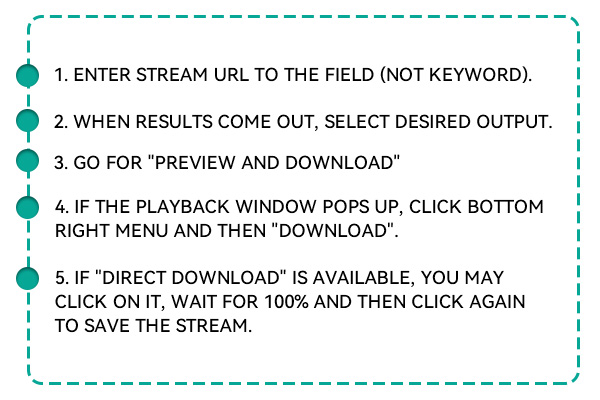


Extract and download high-quality videos from Telegram using just a link.
This fast and easy-to-use Telegram video downloader lets you instantly save videos from public Telegram channels and groups. Whether it's educational content, entertainment clips, or shared updates, you can download any Telegram video directly to your device in just a few clicks. No app installations, no account needed, and no hidden fees - just a clean, reliable way to keep Telegram videos accessible offline.
How to Download Telegram Videos Online?
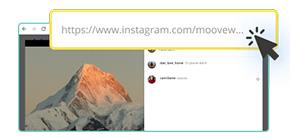
Open the Telegram app and navigate to the public channel, group, or user message that contains the video you want to download. Tap and hold the video message, then select the "Copy Post Link" or "Copy Message Link" option from the menu.
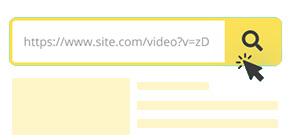
Open your browser and go to the Telegram Video Downloader website. Paste the copied link into the search bar at the top of the page to begin processing. Click the "Download" button next to the input field to allow the tool to retrieve video data.
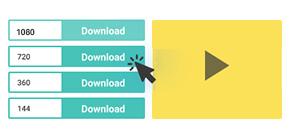
Once the video is ready, select your preferred video format and resolution from the list of options. Then, click "Download Now" to save the video directly to your device, whether you're using a phone, tablet, or computer.
Key Features of the Telegram Video Downloader

No Installation
You don't need to log in, install anything, or have technical access to the Telegram API. Copy the post or message link, paste it into our tool, and download the video in seconds.

Download in HD or Mobile-Friendly Quality
The downloader scans the original Telegram video and provides you with available options, ranging from full HD for professional use to compressed formats for mobile devices.

No Telegram Account Needed
You can use it completely anonymously - no need to log into your Telegram account. It works exclusively with public video links, so there's zero risk of exposing private chats or sensitive data.
Use It Anywhere, Anytime, on Any Device
This tool is fully web-based, meaning you can use it on any device with an internet connection, smartphones, tablets, desktops, or laptops. It's compatible with all major operating systems, including Android, iOS, Windows, macOS, and Linux. You don't have to download an app or install any software, making it a perfect option for users who are always on the move. Whether at work, home, or traveling, you can download Telegram videos instantly through your preferred browser. It works smoothly on Chrome, Safari, Firefox, Edge, and more, offering a seamless experience every time.

Lightweight and Ad-Free Experience
Unlike many other online downloaders that interrupt your experience with ads, pop-ups, or misleading buttons, our tool keeps everything clean and user-friendly. The interface is minimalistic, focused entirely on helping you download your video quickly and without confusion. There are no distractions, hidden redirects, or unnecessary steps. This lightweight design also ensures faster page loads and faster downloads, which is especially helpful for slower networks. You get exactly what you came for, your Telegram video - without any noise or delays. It's a smoother, safer way to download content.

Save Telegram Videos Without Bots or Logins
This Telegram Video Downloader is made for users who want a quick, secure way to save Telegram video content without using bots or joining risky third-party groups. Whether you're archiving educational content, marketing reels, or news footage from public Telegram channels, this tool does the job efficiently. You copy and paste the message link - no setup, extension, or software is needed. Download videos of original quality and store them safely offline for viewing anytime. It's the simplest way to back up Telegram video content.
FAQs
No, the application works with public content that is only available on Telegram. It is unable to view videos sent in private chats, secret groups, or files that need a user login. Doing this will respect your privacy and ensure that the tool stays safe. Admins of private groups may choose to make the post public or reshare it to a public channel to get a copy.
No installation or dealing with bots is needed. Having Telegram on your device is unnecessary when downloading using the downloader. Any browser can download a video if you have the correct public message link, and the video will still be kept private. This is good for people who wish to hold onto files without using Telegram daily.
Most Telegram videos are downloaded in MP4 format for compatibility with all major media players. The resolution depends on what the original uploader shared - common options include 480p, 720p, and 1080p. The downloader will give you multiple options before saving the file so you can choose based on storage size or playback quality needs.
Most of the videos on Telegram are in MP4 format, so they work with multiple media players. The resolution chosen is based on what the first uploader decided—standard resolutions include 480p, 720p, and 1080p. You get several choices before saving the file, which allows you to pick your preferred storage size and quality.
Absolutely. This Telegram Downloader can be used on your phone or tablet without any problems. If you're using Android or iOS, open your browser, go to the website, and copy your Telegram link into the chat. Because the app is just as good as the desktop site, you can save your videos anytime.
Make certain that the video link came from a Telegram message anyone can see. If the video is taken down, hidden from view, or not working, the downloader won't be able to open it. In addition, carefully verify that the entire URL was copied and that it includes all of the characters. If problems keep happening, use a browser to prove the link is verified before using the downloader.
4.8, 1K+ Ratings