





Free Yandex Video Downloader
Quickly download Yandex videos with one link


Save your favorite Yandex videos instantly from your browser.
This free Yandex downloader makes it simple to grab videos directly from Yandex without needing extensions or apps. It works online, giving you a secure and easy way to store your favorite videos offline. Whether you're preserving tutorials, music clips, or visual content, this tool ensures fast and reliable results. All it takes is a video URL - no registration, cost, or fuss.
How to Download Videos from Yandex?

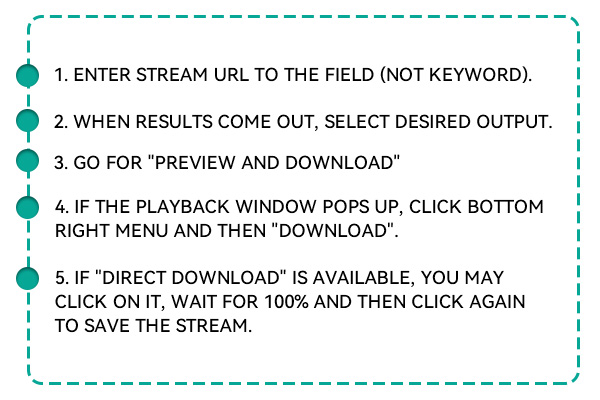
Go to the Yandex website and browse for the video you want to download. Once you've found it, make sure the video is fully loaded and ready to play. Click on the browser's address bar and copy the full URL of the video page.
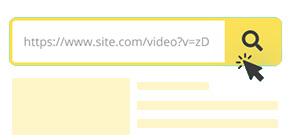
Open the Yandex Video Downloader in a new tab and locate the input field. Paste the copied URL into the search bar exactly as it appears in your browser. Click the “Download” button to let the tool process your video link.

It will scan the page and present available formats and resolution options. Choose the video quality and file type that best suits your needs. Then click the final “Download” button to save the video directly to your device.
Why Choose Our Yandex Video Downloader?

100% Free to Use
This online Yandex video downloader is completely free with no subscriptions, no signups, and no hidden charges.

No Software Installation Required
You don't need to install any apps, plugins, or extensions to use this service. Everything runs directly in your browser.

Works on All Devices and Browsers
Our tool is designed for universal compatibility - whether you're using Windows, macOS, Android, iOS, or Linux, it just works.
Anonymous and Secure Usage
We prioritize your privacy by keeping everything 100% anonymous. No account creation is needed, and we don't store your data, history, or downloaded videos. All activity occurs in your browser session, meaning nothing gets saved or tracked server-side. We also don't use intrusive analytics or cookies that compromise your digital footprint. With HTTPS encryption in place, your connection is secure from end to end. This is a perfect solution for users who are privacy-conscious or simply want to avoid the hassle of handing over personal information. Download with confidence, knowing your activity remains private.

Download in Multiple Qualities and Formats
With this tool, you can select from several resolution and format options based on your needs and the video's original upload. Choose from 360p for faster downloads or go all the way up to 1080p for HD clarity, depending on what's available. The standard download format is MP4, which ensures wide compatibility with most media players and devices. Whether you're saving a clip for your phone, tablet, or TV, you'll have a version that works perfectly. This flexibility allows you to balance quality with file size, ideal for storage-conscious users or high-resolution content lovers.

Save Yandex Videos with Just a Link - No Hassle
This free online tool was created to make video downloading from Yandex simple for everyone. Whether you're storing media for personal use, saving data for a presentation, or collecting educational clips, this service lets you do it all quickly and easily. Just paste the link, select a format, and download in seconds. There are no signups, no installations, and no waiting. It's the easiest way to archive or enjoy Yandex content offline, wherever and whenever you want.
FAQs
This tool allows you to download most public Yandex videos. As long as the video is viewable without login restrictions, the downloader should be able to access it. However, videos behind paywalls, private settings, or login walls may not be accessible. We recommend using the tool only for publicly available content and following all copyright laws when saving media for offline use.
The tool supports a variety of quality options depending on the original upload. Typical formats include MP4, which works on most devices, and resolutions can range from 360p up to 1080p or more. You can choose the one that fits your storage space and screen size. If you want higher quality, ensure the original video supports it, as this tool preserves what's already available.
Yes, it is built for cross-platform safety and compatibility. The downloader is hosted online and doesn't require access to your files or system. It runs in your browser and is secured by HTTPS, keeping your connection safe. Because there's no download or login, there are minimal risks of malware, viruses, or data leaks.
Not at all. This service is designed for instant access—there is no need to register or provide any email addresses. You won't be asked for subscriptions and will never encounter locked features. Everything is available from the moment you open the website. It's designed for people who want fast, barrier-free access to online videos.
Yes, you can use the tool as often as you like. There are no daily limits or waiting times between downloads. Whether downloading a single video or building a collection, the process remains fast and unrestricted. Just paste the links one by one and download them with ease. Heavy users such as educators or content researchers will find this especially helpful.
Currently, the downloader only supports single video links. However, we are exploring including playlists and bulk download features in upcoming updates. If you're handling multiple videos, you can still paste and download each manually without delay. For now, we're keeping the experience clean and streamlined for one video at a time.
4.8, 1K+ Ratings